
Last updated: 12 September 2026
Punjab property owners have a limited-time opportunity to reduce their property tax payment. The Excise, Taxation and Narcotics Control Department Punjab is advertising a 5% rebate on property tax paid by 30 September 2026.
Eligible taxpayers can check their property tax details and complete the payment through ePay Punjab, the Government of Punjab’s digital payment platform. This guide explains the deadline, what you need before starting, how to pay online and what to check before confirming the transaction.
Quick answer: Punjab property taxpayers can receive a 5% rebate on eligible property tax paid on or before 30 September 2026. Use ePay Punjab to find the property record, confirm that the payable amount and rebate are correct, generate the PSID where required, complete the payment through a supported channel and save the official receipt.
Punjab Property Tax Rebate 2026 at a Glance
Rebate: 5% on eligible property tax payment
Deadline: 30 September 2026
Province: Punjab, Pakistan
Responsible department: Excise, Taxation and Narcotics Control Department Punjab
Online platform: ePay Punjab
Useful references: Property PIN, PT-10 number or PSID, as requested by the system
Payment channels: Mobile banking, internet banking, ATM, over-the-counter banking and other channels supported by ePay Punjab
Final proof: Digital or printed payment receipt
The amount shown in the official ePay Punjab or Excise record is the amount that matters. Any arrears, penalties, record corrections or property-specific adjustments may change the final payable amount.
What Does the 5% Property Tax Rebate Mean?
A rebate reduces the eligible tax amount when payment is completed within the announced period. For the current notice, the deadline is 30 September 2026.
Here is a simple illustration:
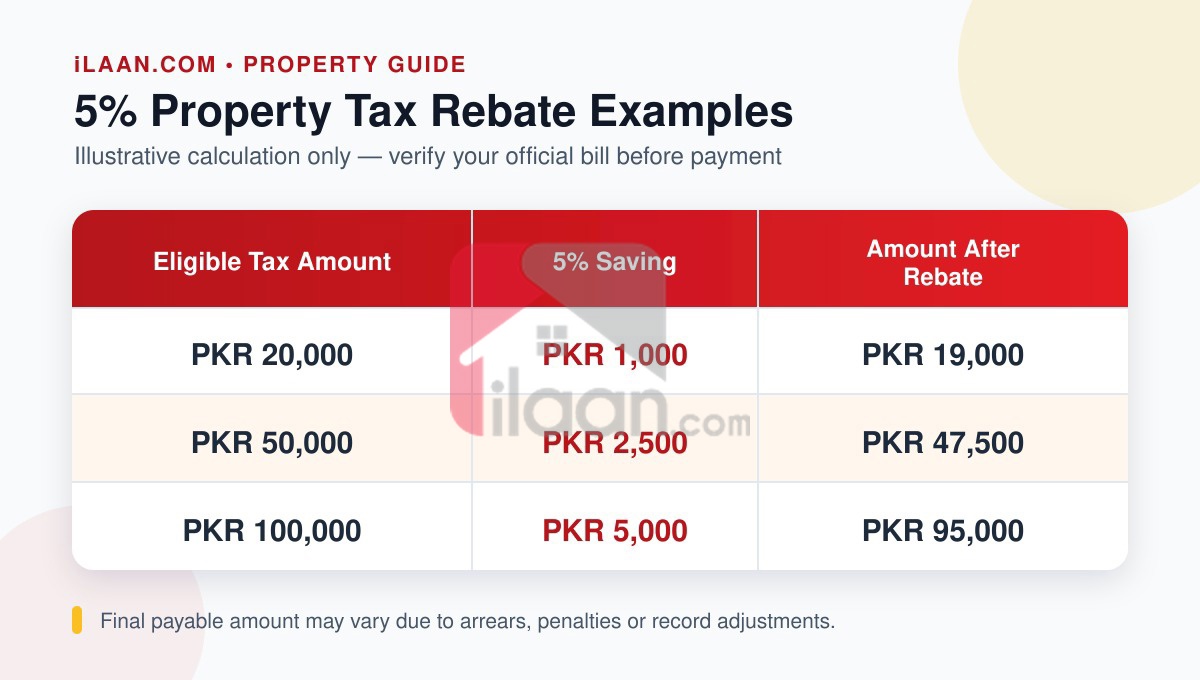
These examples explain the calculation only. Always verify the final amount displayed against your property record before paying.
If you want an initial estimate before checking the government record, try the ilaan Property Tax Calculator. Treat it as a planning tool; the official challan or ePay Punjab record remains authoritative.
Who Should Check the Rebate?
If you own a taxable urban property in Punjab and have property tax due, check your current record before the deadline. This includes owners of eligible residential or commercial property in cities such as Lahore, Rawalpindi, Faisalabad, Multan and Gujranwala.
The official system determines whether the rebate applies to a particular bill. If the property details, ownership record or payable amount appears incorrect, contact the Punjab Excise department before making the payment.
What You Need Before Paying Property Tax Online
Keep the following information ready:
Your CNIC and the mobile number or email used for your ePay Punjab account
Your property tax notice, previous challan or PT-10 record
The property PIN, PT-10 number or an existing PSID, depending on what the service asks for
Access to a supported mobile banking, internet banking, ATM or over-the-counter payment channel
Sufficient funds to complete the payment before the deadline
Review every digit carefully. Entering the wrong reference number may display the wrong record or prevent the property from appearing.
How to Pay Property Tax Online Through ePay Punjab
Step 1: Open the Official ePay Punjab Platform
Visit the official ePay Punjab website or install the official ePay Punjab mobile app published by the Punjab Information Technology Board. Avoid unofficial download links.
Step 2: Create an Account or Sign In
Register with the information requested by the platform, or sign in if you already have an account. Use details you can access in case verification is required.
Step 3: Select Property Tax
Open Excise and Taxation and choose Property Tax from the available services.
Step 4: Find Your Property Record
Enter the property reference requested on the screen. Depending on the current interface and your record, this may be a property PIN, PT-10 number or PSID.
Your previous property tax challan or notice may contain the required number. If you cannot find it, use the official support channel or contact the relevant Excise office instead of trying random numbers.
Step 5: Verify the Property and Tax Details
Before generating or paying a challan, confirm:
Owner name or available ownership details
Property address and identification
Current-year tax and any separately displayed arrears
Payment status
Rebate and final payable amount
Payment deadline
Do not continue if the property or payable amount does not match your records.
Step 6: Generate the Challan or PSID
Generate the payment reference if the platform asks you to do so. ePay Punjab uses a 17-digit Payment Slip ID (PSID) for digital government payments.
Copy the PSID accurately. It is the reference used by supported banking and payment channels to retrieve the bill.
Step 7: Complete the Payment
Use one of the payment channels supported by ePay Punjab, such as:
Mobile banking
Internet banking
ATM
Over-the-counter banking
A supported mobile wallet or telco agent, when available for the transaction
Banking-app labels differ. In most cases, open bill payments or government payments, select ePay Punjab, enter the PSID, verify the displayed bill and confirm the payment.
Step 8: Save and Verify the Receipt
Download the receipt or take a clear screenshot after the transaction is successful. Keep the PSID, transaction ID, date and amount together.
Check the property tax status again after the payment has been processed. If the amount was deducted but the status does not update, do not pay a second time without first checking with your bank and ePay Punjab support.
You can also review the official ePay Punjab tax-payment guide and available payment channels.
What If Your Property Is Not Found or the Amount Is Wrong?
Do not pay an uncertain or mismatched bill merely to meet the deadline. Use this checklist first:
Re-enter the PIN, PT-10 number or PSID carefully.
Check whether current-year tax and arrears are shown separately.
Compare the address and owner details with your challan.
Confirm that the rebate appears in the final payable amount, where applicable.
Contact ePay Punjab or the relevant Punjab Excise office if the record remains incorrect.
Keep screenshots of the error and your previous challan. These can make it easier to explain the issue to official support.
Why a Paid Property Tax Receipt Matters When Selling Property
Property tax records can become relevant during buyer due diligence and the property-transfer process. A current receipt helps the owner show that the displayed tax demand has been paid and can reduce avoidable delays caused by missing records.
Before selling a property, owners should keep these items organised:
CNIC and ownership documents
Registry, allotment or transfer documents, as applicable
Latest property tax receipt
Relevant society or authority documents
Accurate property location, size, condition and demand price
If you plan to sell a house in Lahore, you can also review current houses for sale in Lahore before setting your asking price.
Paid Your Tax? List Your Property Directly on ilaan
Once your records are organised, list your property free on ilaan. Property owners can connect directly with serious buyers or tenants and complete a zero-commission deal without an unnecessary middle layer.
Direct owner deal. Serious buyers and tenants. Zero commission.
Frequently Asked Questions
What is the Punjab property tax rebate in 2026?
Punjab Excise is advertising a 5% rebate on eligible property tax paid by the announced deadline. The property-specific amount displayed by the official system should be checked before payment.
What is the last date for the 5% property tax rebate in Punjab?
The announced deadline is 30 September 2026. Unless the Government of Punjab officially extends the date, taxpayers should not assume that the rebate will remain available after the deadline.
How can I pay property tax online in Punjab?
Use the official ePay Punjab website or app. Select Excise and Taxation, choose Property Tax, find the property using the reference requested by the system, verify the bill, generate the PSID if required, pay through a supported channel and save the receipt.
What is a PSID in ePay Punjab?
PSID means Payment Slip ID. ePay Punjab generates a unique 17-digit PSID that supported banks and payment channels use to retrieve and process a government payment.
Where can I find my PT-10 number or property PIN?
Check your current or previous property tax notice or challan. If the reference is missing or unreadable, contact the relevant Excise office or official ePay Punjab support.
Is the 5% rebate applied automatically?
The official payable amount should reflect the rebate when the property and payment are eligible. Confirm the discounted amount before paying. If it does not appear, contact the responsible department rather than calculating and deducting the amount yourself.
Can I pay without visiting an Excise office?
Yes, property tax is available through ePay Punjab. Once a valid payment reference is available, supported channels include mobile banking, internet banking, ATM and over-the-counter banking.
What should I do if money is deducted but the payment remains unpaid?
Keep the transaction ID and receipt, check with the bank and contact ePay Punjab support. Do not immediately repeat the payment, as this may create a duplicate transaction.
Does this 5% rebate apply outside Punjab?
This notice is from Punjab’s Excise department and relates to Punjab property tax. Property owners in other provinces should check the relevant provincial or local tax authority.
Does ilaan collect Punjab property tax?
No. ilaan provides this guide for property-owner awareness. Pay taxes only through official Government of Punjab channels and verify the final bill with the responsible department.
Important Note
This article provides general information based on official sources available on 12 September 2026. Tax eligibility, assessments, arrears, penalties, system procedures and deadlines can change. Confirm your property-specific details through the Punjab Excise department or ePay Punjab before completing a payment.